CasePix sends SMS text messages for a single purpose: delivering one-time
passcodes (OTPs) that a user needs to log in to their CasePix account. These
codes are how a patient signs in to view their treatment photos and progress, and how
practice staff sign in to the CasePix app. CasePix never sends marketing,
promotional, or advertising text messages of any kind.
How you opt in — everyone (patients and practice staff)
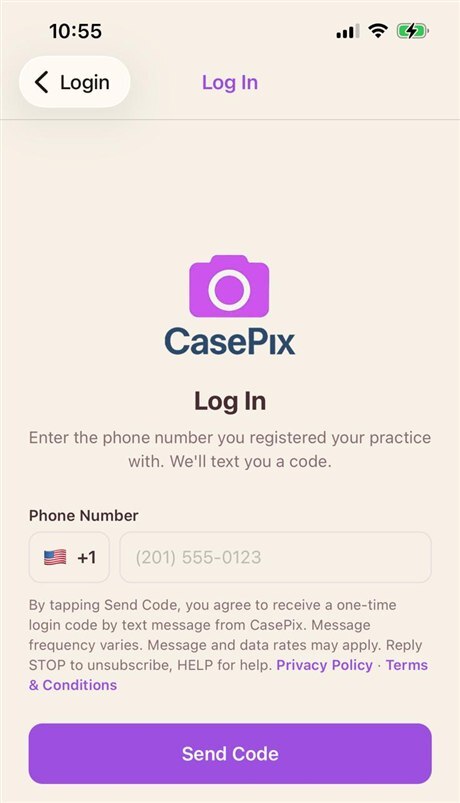
A text message is sent only after you ask for it yourself. On every CasePix log-in screen
that offers a text code, the screen shows this notice directly under the phone-number field, with links to
our Privacy Policy and Terms & Conditions:
“By tapping Send Code, you agree to receive a one-time login code by text message from CasePix. Message frequency varies. Message and data rates may apply. Reply STOP to unsubscribe, HELP for help. Privacy Policy · Terms & Conditions”
The person opens the CasePix app and chooses to log in.
They enter their own mobile phone number. The notice above is displayed under the field.
They tap Send Code. This is the opt-in action. One one-time passcode is sent to that number — and nothing else.
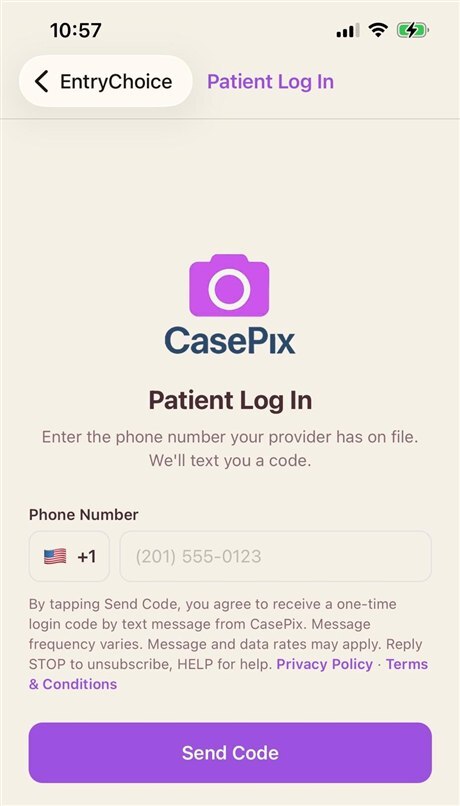
Practice staff log-in: phone field, the SMS notice with its Privacy Policy and Terms links, and the Send Code button.Patient log-in: the same notice and links under the phone field.
Patients also give express consent in person
In addition, a patient's consent is collected in person, at the dental practice, during enrollment:
A patient visits their dental practice.
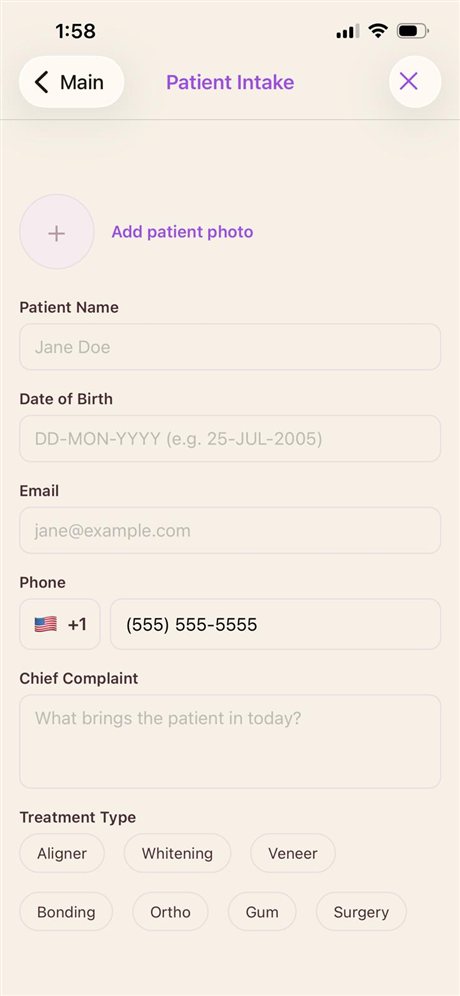
Practice staff open the CasePix app and begin patient intake, entering the patient's name and mobile phone number.
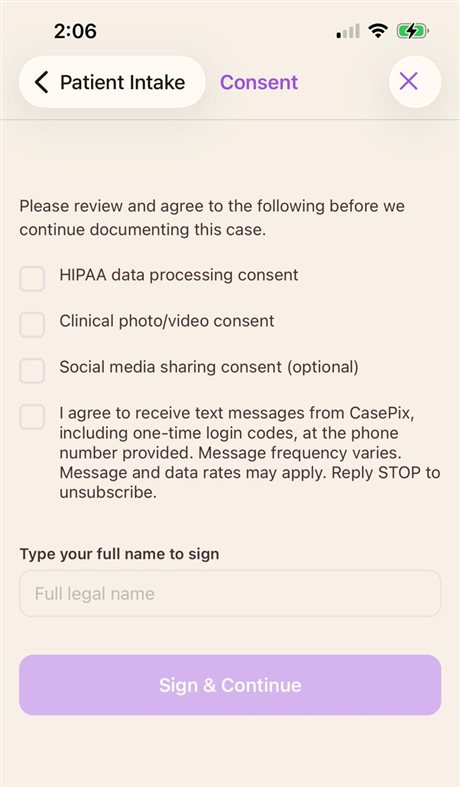
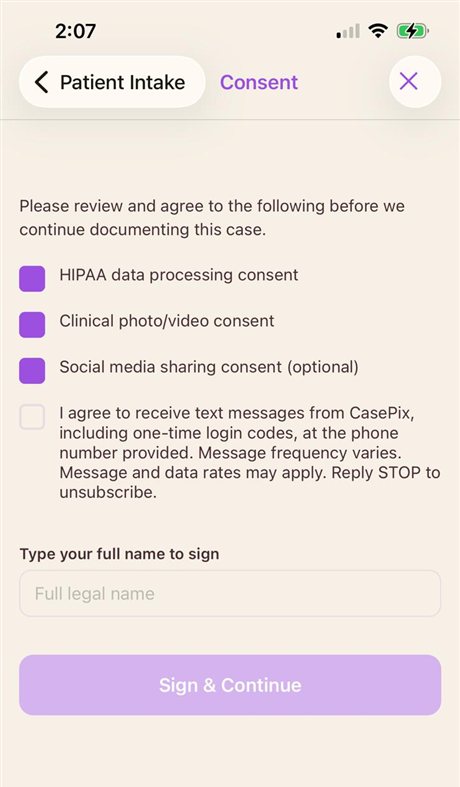
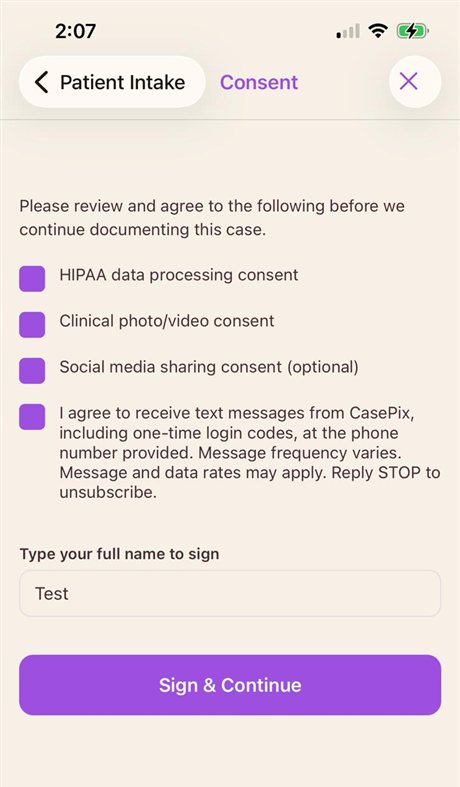
Before intake can be completed, the app displays the consent screen shown here. The patient reviews it and must actively check the box (it is unchecked by default) that reads:
“I agree to receive text messages from CasePix, including one-time login codes, at the phone number provided. Message frequency varies. Message and data rates may apply. Reply STOP to unsubscribe.”
The patient then types their full name to sign. Their consent, name, and a timestamp are recorded.
Later, when the patient opens the CasePix patient portal and taps “Send Code” (the log-in screen shown above), a one-time passcode is sent by SMS to the number on file — only in response to that login attempt.
Step 2 — Patient Intake: the patient’s mobile phone number is entered in the Phone field (with a country-code selector) during intake.
The consent screen in the live app
These are unedited screenshots of the real CasePix consent screen (steps 3–4 above). The
SMS box is separate from the other consents, is unchecked by default, and must be
checked by the patient before they can sign.
1. Consent screen as first shown — every box unchecked, including the SMS opt-in. Sign & Continue is disabled.2. The other consents ticked — the SMS box is still unchecked and must be checked on its own.3. SMS box checked and the patient’s full name typed — Sign & Continue is now enabled.
Messages are sent only when a login is initiated — typically a
few per month per user. No messages are sent at any other time.
How to opt out
Reply STOP (or CANCEL, QUIT, UNSUBSCRIBE, END) to any CasePix message
at any time. You will receive one confirmation that you have been unsubscribed, and no
further messages will be sent. Because a text code is how a patient signs in to the CasePix
patient portal, opting out will stop those codes until you opt back in by replying
START.
How to get help
Reply HELP (or INFO) to any CasePix message, or email
support@casepix.online. Message and data
rates may apply.
Carriers
Carriers and our messaging provider are not liable for delayed or undelivered messages.
Your mobile information
Mobile phone numbers and SMS consent are never sold, rented, or shared with
third parties or affiliates for marketing or promotional purposes. Text
messaging originator opt-in data and consent are not shared with any third parties.
We use a messaging provider (Twilio) solely to deliver each code on our behalf; it receives
the recipient's number and the message text only for that purpose.
More information
Privacy Policy — see Section 9, “Mobile Information and SMS Privacy”